Build a client portal without a developer.
Your clients sign in to their portal, at your address and in your colours, and see only their own projects, orders and documents, drawn from your team's base.
- 50 portal users included in the Business plan
- The same data as your team, no double entry
- Hosted in Europe, outside the Cloud Act
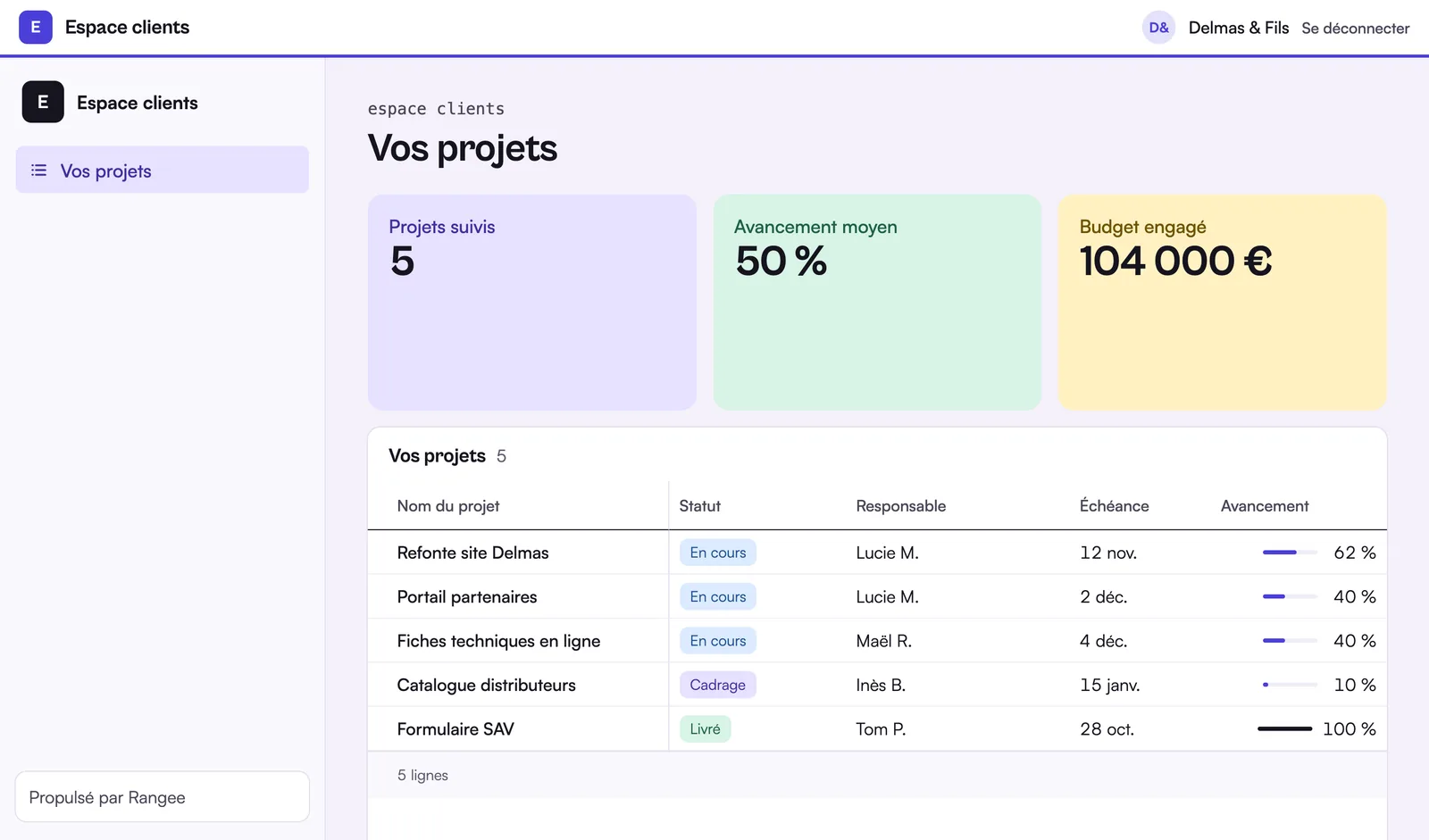
What your client sees
Delmas & Fils signs in with their e-mail and sees only their five projects: status, owner, due date and progress, drawn straight from your team's base.
Three steps, not a line of code
Choose what each person sees
Build the portal from blocks, then filter each block on “Me”: the signed-in client sees only their own rows.
Invite your clients
Tick their access in your contacts table: they sign in with a code sent by e-mail, with no password to remember.
They view
Progress, lists and dashboards, up to date with your team's base, read only.
Each client only sees their own data
Filtering happens on our servers, not in the browser: each client receives only their own rows and the pages opened to their role, even if they tamper with the address. Removing a contact's access closes their portal at once.
Sign-in with a code
Your clients sign in with a code sent by e-mail: no passwords to manage.
Pages by role
Open each group of pages to all your contacts or to one role (Client, Partner…), and nothing more.
Your address and your colours
The portal lives at its own address, name.rangee.site, with your logo and your colour, contrast checked.
View as a contact
Before publishing, see the portal exactly as a client will, with their data.
50 users included
The Business plan includes 50 portal users, then €10 excl. VAT per batch of 50, counted only on the days the portal is published.
Public forms
For a request or some information, a form shared by link feeds your base directly.
A portal for every relationship
Client portal: what are the options?
Three ways to give your clients access. Our view, including when it isn't Rangee.
| Criterion | Custom development | Dedicated portal software | No-code base with a portal |
|---|---|---|---|
| Time to set up | Several weeks | A few days | A few hours |
| Upfront cost | High | Subscription, often per client | Included in the Business plan |
| Data linked to your tools | To be developed | Import or connectors | Same base as your team |
| Customisation | Complete | Limited to the product | Broad, without code |
| Maintenance | A developer | The vendor | The vendor |
| Ideal for | A very specific need | A single standard use | Data already managed in-house |
Custom-built
Relevant if your portal is your product, or if your business rules are very particular.
Dedicated software
Good for a standard, standalone use, if your data already lives in that tool.
A no-code base
The fastest when the team already manages its projects or files in spreadsheets.
Frequently asked questions
Another question? Write to us.
Open your first client portal.
The client portal is available to beta participants. Book your place.
Your client portal, as soon as you are invited.
Start from your existing projects: import your file and open access to a first client.